Chapter 10
Chapter 10 — Slash commands
Slash commands are the control plane. Type / followed by a name to
run a command instead of sending the line to the model. Type /help
any time to see the full list.
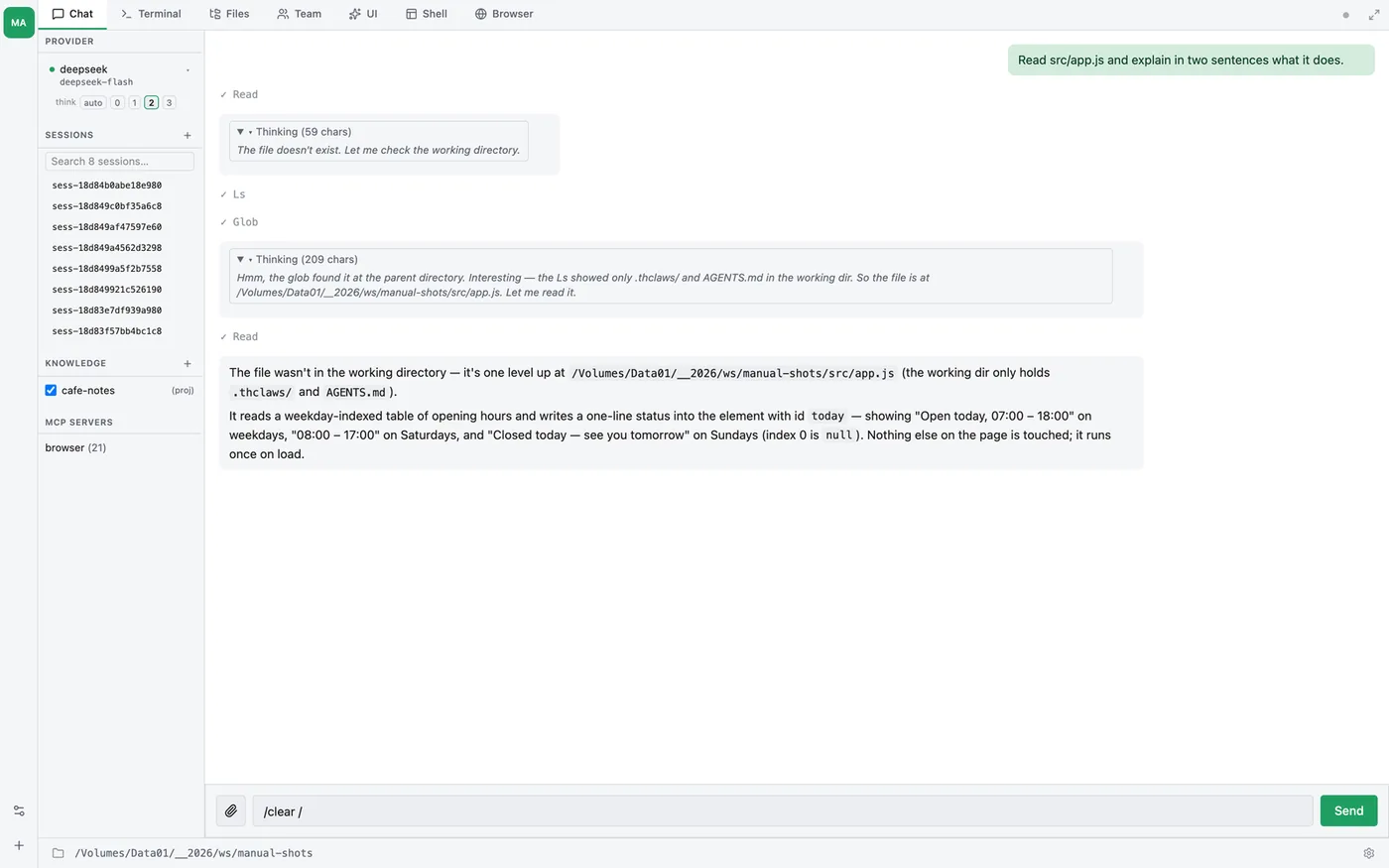
CLI and GUI are peers. Every command in this chapter works identically from the CLI REPL, the GUI’s Terminal tab, and the GUI’s Chat tab — the
/<word>input goes through the same dispatcher in all three surfaces. A few commands that mutate tool state (/mcp add,/skill install,/plugin install,/kms use) even activate their effects in the current session without a restart; the table notes which ones.
Resolution order
When you type /<word>, thClaws resolves it in this order:
- Built-in command — the table below.
- Installed skill — rewrites the line into a
Skill(name: "word")invocation (Chapter 12). - Legacy prompt command —
.mdtemplate from acommands/directory, with$ARGUMENTSsubstituted (this chapter). - Unknown — yellow error.
First match wins. Skills never shadow built-ins because built-ins are tried first.
Built-in command reference
Session & model
| Command | What it does |
|---|---|
/help |
Show all built-in commands |
/model [NAME] |
Show current model, or switch to NAME (validated; typos revert) |
/models |
List available models from the current provider — prints fully-qualified routable ids (e.g. openrouter/google/gemma-3-27b-it:free) so any row pastes straight into /model <id>. Non-chat models (audio/image generation) are filtered out automatically; OpenRouter rows also filter when “Free only” is on in Settings. /models refresh re-seeds from the upstream provider list |
/provider [NAME] |
Show current provider, or switch |
/providers |
List every provider + its default model |
/save |
Force-save the current session to disk |
/load ID\|NAME |
Load a session by id, id-prefix, or title |
/sessions |
List saved sessions (newest first) |
/rename [NAME] |
Rename the current session (no arg clears the title) |
/fork |
Save the current session, then start a fresh one seeded with a summary of it — a clean context that remembers where you were |
/resume ID\|NAME |
(CLI flag --resume) restart with a session loaded |
/clear |
Wipe in-memory history (doesn’t touch saved files) |
/history |
Print a message-count summary |
/translate [--language=<code>] <text or file> |
Translate text or a file in a side conversation — an alias for /agent translator …, so it never touches your session |
/summarize [--language=<code>] <text> |
Summarise in a side conversation — an alias for /agent summarizer …. --language sets the summary’s language, not the source’s |
/extract <url or file> |
Clip a page or file into clean markdown, images downloaded alongside. Runs isolated, so the raw page never enters your context — the point of it for long pages |
/compact |
Summarise history to free tokens |
/cwd |
Show the working directory (sandbox root) |
/pwd |
Same thing — the shell name for it |
Memory & context
| Command | What it does |
|---|---|
/memory |
List memory entries |
/memory read NAME |
Print a memory entry |
/context |
Show the combined system prompt (project + agents + skills catalog) |
Tools, skills, plugins, MCP
| Command | What it does |
|---|---|
/marketplace [--refresh] |
Open the unified marketplace browser (GUI modal: skills · MCP · plugins · subagents). CLI prints a combined summary |
/skills |
List loaded skills |
/skill show NAME |
Full description + path for a skill |
/skill marketplace [--refresh] |
Browse the catalog at thclaws.ai/api/marketplace.json |
/skill search QUERY |
Substring-search the marketplace catalog |
/skill info NAME |
Marketplace detail for one skill (license, source, install URL) |
/skill install [--user] <name-or-url> [name] |
Install a skill — bare slug → marketplace lookup, otherwise git or .zip URL |
/mcp marketplace [--refresh] |
Browse hosted + installable MCP servers in the catalog |
/mcp search QUERY |
Substring-search the MCP marketplace |
/mcp info NAME |
MCP marketplace detail (transport, command/url, license) |
/mcp install [--user] NAME |
Install a marketplace MCP — clones source if needed, writes mcp.json entry |
/plugin marketplace [--refresh] |
Browse the plugin catalog |
/plugin search QUERY |
Substring-search the plugin marketplace |
/plugin info NAME |
Marketplace detail for one plugin (use /plugin show NAME for installed) |
/subagent marketplace [--refresh] |
Browse subagents (agent defs) in the catalog |
/subagent search QUERY |
Substring-search the subagent marketplace |
/subagent info NAME |
Marketplace detail for one subagent |
/subagent install [--user] <name-or-url> [name] |
Install a subagent .md — bare slug → marketplace lookup, otherwise git or .zip URL |
/<skill-name> [args] |
Invoke an installed skill directly |
/<command-name> [args] |
Invoke a legacy prompt command (template) |
/plugins |
List installed plugins (enabled + disabled) |
/plugin install [--user] <url> |
Install a plugin bundle |
/plugin remove [--user] <name> |
Uninstall a plugin |
/plugin enable [--user] <name> |
Enable a disabled plugin |
/plugin disable [--user] <name> |
Disable without uninstalling |
/plugin show <name> |
Manifest details |
/mcp |
List active MCP servers and their tools |
/mcp add [--user] <name> <url> |
Register a remote (HTTP) MCP server |
/mcp remove [--user] <name> |
Remove an MCP server from config |
Knowledge bases (KMS)
| Command | What it does |
|---|---|
/kms (or /kms list) |
List every discoverable KMS; * marks ones attached to this project |
/kms new [--project] NAME |
Create a new KMS (default scope is user) |
/kms use NAME |
Attach a KMS to this project’s chats |
/kms off NAME |
Detach a KMS |
/kms entry [NAME] [--set SLUG \| --clear] |
Show or set the page the KMS browser opens on. Recorded when the KMS’s first page is created; inferred when nothing is recorded |
/kms verify [NAME] [--llm] [--fix] |
Evidence check: citations resolve, archived sources still carry their quotes, nothing asserts a number uncited. --llm adds a per-page entailment audit; --fix unwraps links written inside URLs |
/kms rename OLD NEW |
Rename a KMS folder; the attachment follows (also: right-click a KMS in the sidebar) |
/kms drop NAME [--force] |
Delete a KMS; dry-run without --force (also: sidebar right-click → Delete…) |
/kms show NAME |
Print the KMS’s index.md |
/kms maintain NAME [--apply] |
One-command maintenance: structural fixes + source reconciliation vs live sessions + stale refresh + contradiction reconciliation, in one staged pass. Dry-run by default. GUI-only. Alias: tidy |
/kms html NAME [OUT] |
Generate a single-file interactive HTML site from a KMS (v0.8.5+). Agent reads the KMS via tools, designs components, writes <OUT>/index.html (default ./<NAME>-site/) in your workspace |
/kms export-okf NAME [OUT] |
Export a KMS as an Open Knowledge Format (OKF) bundle to ./NAME-okf/ (or OUT) for portable interchange |
/kms import-okf BUNDLE NAME [--project] |
Create a new KMS from an OKF bundle folder (default scope is user) |
/dream [FOCUS] |
Consolidate the project’s KMS by mining recent sessions (GUI-only, dispatches a built-in side-channel agent) |
See Chapter 9 for the full KMS concept + workflow, including the /kms html HTML export, OKF import/export (also on the sidebar’s right-click “Knowledge” menu), graph view, and the /dream consolidation flow.
Background research
| Command | What it does |
|---|---|
/research <query> |
Spawn a background research job — multi-iteration web search + multi-page KMS write |
/research [--kms NAME] [--max-notes N] [--max-iter K] [--novelty 0.X] [--worker-model ID] [--append] [--dry-run] [--budget-time T] <query> |
Start with overrides (see ch20) |
/research (or /research list) |
List all jobs (newest first) |
/research status ID |
Detailed view (phase, iteration, score) |
/research show ID |
Print synthesized result in chat |
/research cancel ID |
Cancel a running job; partial result discarded |
/research wait ID |
Block CLI prompt until terminal (CLI-only) |
/policy (or /policy status) |
Active org policy: source file, issuer, expiry, which blocks are on, and audit sinks with their dropped-record counts (Enterprise) |
See Chapter 20 for the full pipeline + KMS layout + flag reference.
Agent behaviour
| Command | What it does |
|---|---|
/permissions MODE |
Switch between auto and ask mid-session |
/thinking 0-3 |
Thinking level for every provider: 0 off · 1 low · 2 medium · 3 high · auto (provider default). Also /thinking <tokens> for a raw budget. Same knob as the think pills under the model chip; persists to thinkingBudget |
/tasks |
List tasks / todos the agent has created |
/plan [enter\|exit\|status] |
Toggle plan mode — read-only exploration, then step-gated execution. status reports the current plan without changing mode (Chapter 18) |
/config key=val |
Override a config value for this session only |
/agent NAME PROMPT |
Spawn a user-driven side-channel subagent (GUI-only, runs concurrently with main) |
/agents |
List active background side-channel agents (id, name, elapsed) |
/agent cancel ID |
Cancel a running side-channel agent |
/agent new NAME |
Open the GUI editor to author a new agent def (.thclaws/agents/NAME.md) — GUI-only |
/agent edit NAME |
Open the GUI editor for an existing/built-in agent def — GUI-only |
/dream [FOCUS] |
Dispatch the built-in dream agent to consolidate KMS (GUI-only) — see Chapter 9 |
/team |
Attach to the team tmux session (or show team status) |
/doctor |
Run diagnostic checks |
/cost |
Session spend, by provider and model |
/usage |
Token usage by provider and model |
/version |
Show the thClaws version and commit SHA |
/system [stats \| grep <pattern>] |
Print the system prompt actually being sent this turn. stats shows its size breakdown by section; grep <pattern> searches it — useful for “is my AGENTS.md actually in there?” |
/reload |
Re-read settings, skills, agents and MCP config without restarting |
/reload-prompt |
Re-read only the prompt templates |
/quit |
Exit (aliases: /exit, /q). In the GUI, opens a native confirm dialog (“Quit?”) before closing — Cancel keeps the session open |
Automation
Each of these has its own chapter; the table is the quick reference.
| Command | What it does |
|---|---|
/schedule list \| show <id> \| run <id> \| pause\|resume <id> \| rm <id> |
Manage recurring (cron / interval / watch) jobs — see Chapter 19 |
/loop <interval> <body> | status | stop |
Repeat a message on a fixed interval (default 5 min). One loop at a time — see Chapter 31 |
/goal start <objective> [--budget-tokens N] [--budget-time T] [--auto] [--require <path>] | status | show | continue | complete | abandon |
A long-running objective the agent audits itself against, with budgets and hard limits. Pairs with /loop, or drives itself with --auto — see Chapter 31 |
/workflow run <goal> \| exec <path> \| list \| inspect <id> \| resume <id> \| rm <id> |
Author, review and run a multi-agent workflow script — see Chapter 25 |
Cloud and deployment
| Command | What it does |
|---|---|
/cloud list [--mine] \| get <slug> \| status |
Browse and install agents from the thClaws.cloud catalog — see Chapter 27 |
/publish <file.html> |
Put a self-contained HTML page on the web at a private URL that expires in 3 days. Needs a thClaws.cloud token and a credit balance above zero |
/deploy [--pod URL] [--token T] [--dry-run] [--full] [--no-restart] |
Ship this workspace’s .thclaws/ to a remote pod. --dry-run first |
Learning
| Command | What it does |
|---|---|
/quiz <topic\|url\|file> |
Generate a study quiz from a topic, a URL or a local file, then play it |
Shell escape
| Command | What it does |
|---|---|
! <command> |
Run <command> in the terminal directly, bypassing the agent |
Useful for quick sanity checks (! ls, ! git status) without spending
model tokens.
Skill and command shortcuts
Any installed skill is callable as /<skill-name>:
❯ /skills
  docx — Create, read, edit Word documents
  pdf  — Read, split, merge, OCR PDFs
  …

❯ /pdf extract text from report.pdf
(/pdf → Skill(name: "pdf"))
Using the pdf skill to extract text from report.pdf…
Legacy prompt commands live as markdown files:
# .thclaws/commands/review.md
---
description: Code review a branch
---
Review the diff from `main` to HEAD. Flag security issues, bad naming,
and missing tests. Focus on $ARGUMENTS.
❯ /review authentication
(/review → prompt from .thclaws/commands/review.md)
Reviewing the diff, focused on authentication…
$ARGUMENTS expands to whatever came after the command name. If the
template has no placeholder and the user typed args, they’re appended
on a blank line.
Writing your own slash commands
For quick one-liners, drop an .md file into .thclaws/commands/.
For anything with scripts or scaffolding, make it a skill (Chapter 12).
For a whole bundle (skills + commands + MCP), ship it as a
plugin (Chapter 16).